# User Interfaces
## Working in a Jupyter notebook environment
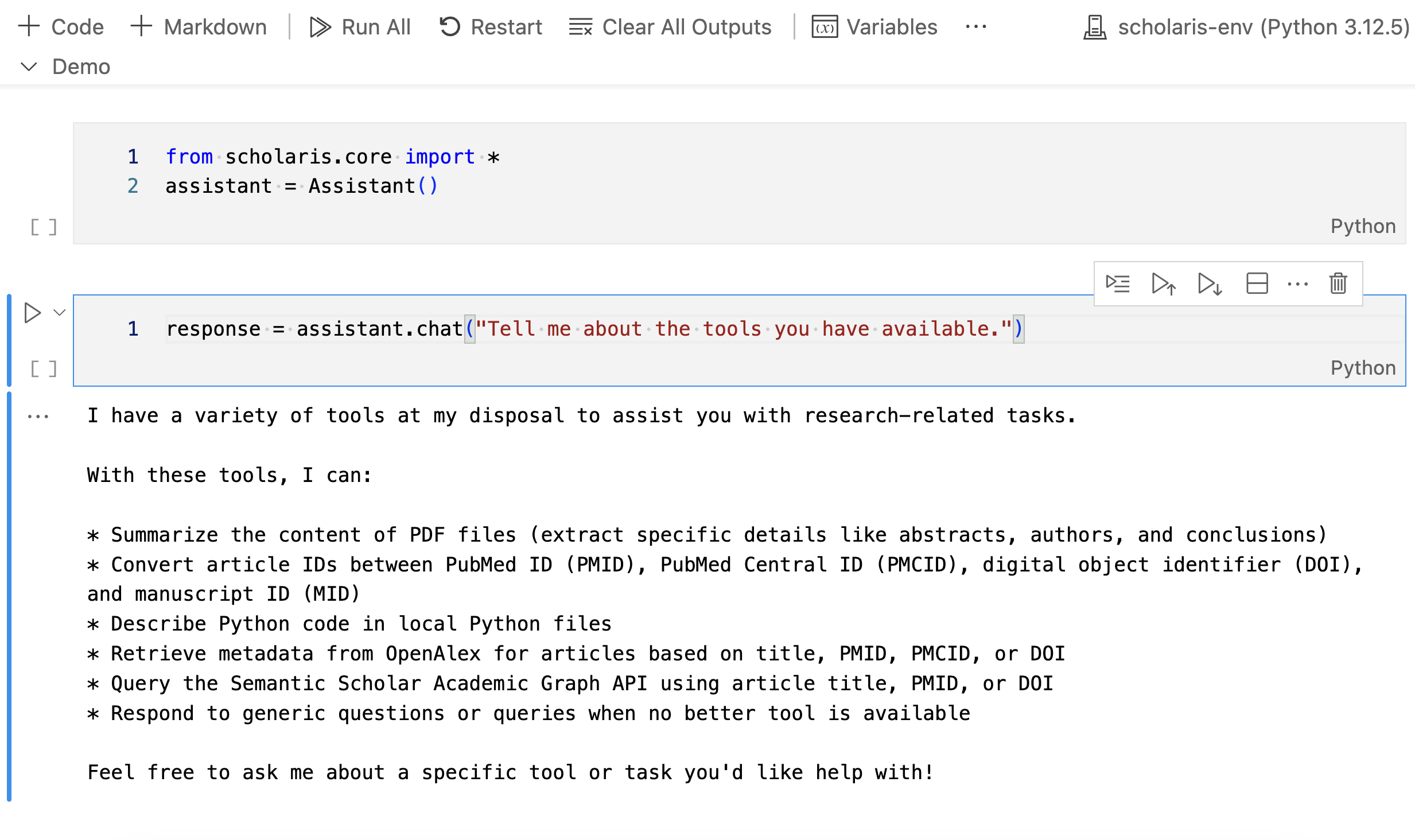
Jupyter Notebook Interface
``` python
from scholaris.core import *
```
``` python
assistant = Assistant()
```
Loaded Semantic Scholar API key from the environment variables.
Loaded email address from the environment variables.
A local directory /Users/user2/GitHub/scholaris/data already exists for storing data files. No of files: 1
``` python
assistant.chat("Tell me about your tools")
```
I can assist with a variety of tasks, including:
* Extracting text from PDF files
* Retrieving titles and first authors of research articles
* Summarizing local documents (PDF, markdown, or text)
* Describing Python code in local files
* Converting IDs (PMIDs, PMCIDs, DOIs) using the id_converter_tool
* Querying OpenAlex API for article metadata based on title, PMID, PMCID, or DOI
* Querying Semantic Scholar Academic Graph API for article metadata based on title, PMID, or DOI
Please let me know how I can assist you with any of these capabilities!
'I can assist with a variety of tasks, including:\n\n* Extracting text from PDF files\n* Retrieving titles and first authors of research articles\n* Summarizing local documents (PDF, markdown, or text)\n* Describing Python code in local files\n* Converting IDs (PMIDs, PMCIDs, DOIs) using the id_converter_tool\n* Querying OpenAlex API for article metadata based on title, PMID, PMCID, or DOI\n* Querying Semantic Scholar Academic Graph API for article metadata based on title, PMID, or DOI\n\nPlease let me know how I can assist you with any of these capabilities!'
> **Tip**
>
> To list the files in the local data directory that has been created at
> initialization, simply use the Python built-in `os` module. Pass the
> assistant’s `data_dir` attribute as an argument to the `os.listdir()`
> function, like so:
>
> ``` python
> import os
> os.listdir(assistant.dir_path)
> ```
>
> You can alos use Python’s built-in functions to copy files from a
> designated source (e.g., Downloads) to the local data directory that
> was created at initialization. For example, to copy a file named
> `example.md` from the Downloads directory to the local data directory,
> use the following code:
>
> ``` python
> import shutil
> shutil.copy(os.path.expanduser('~/Downloads/example.md'), assistant.dir_path)
> ```
>
> Likewise, to remove a file from the local data directory, use the
> following code:
>
> ``` python
> os.remove(os.path.join(assistant.dir_path, 'example.md'))
> ```
## Use the assistant with Streamlit
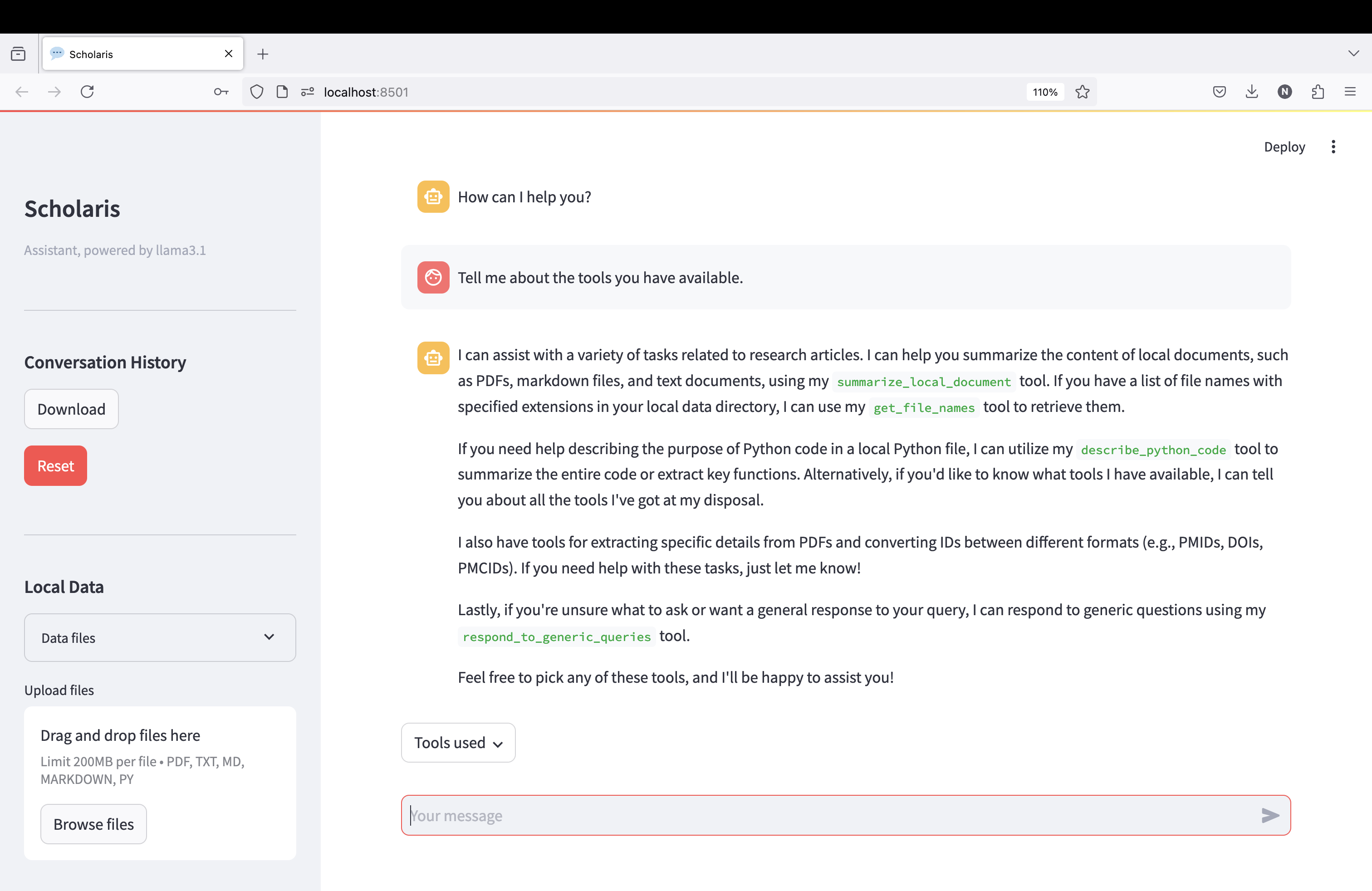
Streamlit Interface
To use the assistant with [**Streamlit**](https://streamlit.io/), you
need to install the [Streamlit
package](https://pypi.org/project/streamlit/).
> **Note**
>
> Remember to set up a virtual environment for your project before
> installing Streamlit. This will help you avoid conflicts with other
> packages that you may have installed in your base environment.
You can install Streamlit using pip:
``` sh
pip install streamlit
```
Then, download the `ui.py` file from the `scholaris` directory in the
Scholaris repository. Run the following command in the terminal to
download the file to your current working directory:
``` sh
wget https://raw.githubusercontent.com/nicomarr/scholaris/main/ui.py
```
If wget is not installed on your local computer, you may also use curl,
like so:
``` sh
curl -O https://raw.githubusercontent.com/nicomarr/scholaris/main/ui.py
```
To run the streamlit app, activate the virtual environment. Then, go to
the directory where the `ui.py` file is located and run the following
command in the terminal:
``` sh
streamlit run ui.py
```
This will start the local server and the app will be accessible in your
local network via a web browser. Alternatively, you can run the command
in the terminal with an additional flag so that the app will only be
accessible from your local computer:
``` sh
streamlit run ui.py --browser.serverAddress localhost
```
> **Note**
>
> If you don’t want to download the `ui.py` file from Github, you can
> also copy the code block from below and paste it into a new Python
> file in your working directory. Then run it using the command
> `streamlit run .py`.
>
>
> Code
>
> ``` python
> from scholaris.core import *
> import streamlit as st
> import ollama
> from datetime import datetime
> import json
> import os
> from pathlib import Path
>
> def download_conversation_history():
> now = datetime.now().strftime("%Y-%m-%d_%Hh%Mm%Ss")
> conversation_history = st.session_state.assistant.messages
> filename = f"conversation_history_{now}.json"
> return json.dumps(conversation_history, indent=2), filename
>
> def show_local_data(dir_path: Path) -> None:
> try:
> for file in dir_path.iterdir():
> st.write(f"{file.name}")
> except Exception as e:
> st.write(f"Error: {e}")
>
> def handle_file_uploads(uploaded_files):
> dir_path = st.session_state.assistant.dir_path
> if not dir_path.exists():
> return
>
> for uploaded_file in uploaded_files:
> file_path = st.session_state.assistant.dir_path / uploaded_file.name
> if file_path.exists():
> continue
> try:
> with open(file_path, "wb") as f:
> f.write(uploaded_file.getbuffer())
> if "uploaded_files" not in st.session_state:
> st.session_state["uploaded_files"] = []
> st.session_state["uploaded_files"].append(file_path)
> except Exception as e:
> error_placeholder = st.empty()
> error_placeholder.error(f"Error saving {uploaded_file.name}: {str(e)}")
> time.sleep(1) # Display error for 1 second
> error_placeholder.empty()
> uploaded_files = []
>
> def delete_uploaded_files():
> if "uploaded_files" in st.session_state and st.session_state["uploaded_files"] != []:
> file_count = 0
> for file_path in st.session_state["uploaded_files"]:
> try:
> os.remove(file_path)
> file_count += 1
> except Exception as e:
> error_placeholder = st.empty()
> error_placeholder.error(f"Error deleting {file_path}: {str(e)}")
> time.sleep(1) # Display error for 1 seconds
> error_placeholder.empty()
> st.write(f"{file_count} file(s) deleted.")
> st.session_state.uploaded_files = []
>
> def get_last_tool_names(messages):
> """Returns the tool names from the most recent tool call in the messages."""
> tool_names = []
> for message in reversed(messages):
> if message["role"] == "assistant" and "tool_calls" in message:
> for fn in message["tool_calls"]:
> name = fn["function"].get("name")
> if name:
> tool_names.append(name)
> break # Exit the loop after the first occurrence
> return ", ".join(tool_names) if tool_names else "No tools used."
>
> # Page configuration
> st.set_page_config(
> page_title="Scholaris",
> page_icon=":speech_balloon:",
> layout="wide",
> initial_sidebar_state="collapsed",
> menu_items={
> "About": "This is a graphical user interface for Scholaris, a conversational AI assistant for academic research.",
> "Get Help": "https://github.com/nicomarr/scholaris/blob/main/nbs/02_ui.ipynb",
> "Report a Bug": "https://github.com/nicomarr/scholaris/issues/new"
> }
> )
>
> # Initialize the assistant if not already in session state
> if "assistant" not in st.session_state:
> try:
> st.session_state.assistant = Assistant(model="llama3.1", dir_path="./data")
> except Exception as e:
> if "[Errno 61] Connection refused" in str(e):
> st.error(f"""An error occurred: {e}. Please make sure Ollama is installed on your local computer and the server is running.
> For troubleshooting, refer to the Ollama docs of GitHub:
> [README](https://github.com/ollama/ollama/blob/main/docs/README.md)
> [FAQ](https://github.com/ollama/ollama/blob/main/docs/faq.md).
> """)
> else:
> st.error(f"An error occurred: {e}")
> st.stop()
>
> # Initialize other session state variables
> if "uploaded_files" not in st.session_state:
> st.session_state.uploaded_files = []
>
> # Start conversation
> if len(st.session_state.assistant.messages) < 2: # <2 because the assistant is initialized with a system message
> st.session_state.assistant.messages.append({"role": "assistant", "content": "How can I help you?"})
>
> if st.session_state.assistant:
> with st.sidebar:
> # Set up the sidebar
> st.title("Scholaris")
> st.caption(str(st.session_state.assistant))
> # Conversation History Section
> st.write("---")
> st.subheader("Conversation History")
> st.download_button(label="Download",
> help="Download the conversation history as a JSON file.",
> data=download_conversation_history()[0],
> file_name=download_conversation_history()[1],
> mime="text")
>
> if st.button(label="Reset", type="primary",
> help="Click to restart the conversation.",
> key="reset_messages"):
> st.session_state.assistant.clear_conversation_history()
> st.session_state.assistant.messages.append({"role": "assistant", "content": "How can I help you?"})
> st.write("Conversation history cleared!")
> # st.rerun() # Rerun the script to update the chat interface and the sidebar
>
> # Local Data Section
> st.write("---")
> st.subheader("Local Data")
> dir_path = st.session_state.assistant.dir_path
> with st.expander("Data files"):
> show_local_data(dir_path)
>
> # File Upload Section
> uploaded_files = st.file_uploader(
> label="Upload files",
> type=['pdf','txt','md','markdown','py'],
> accept_multiple_files=True,
> )
> if uploaded_files:
> handle_file_uploads(uploaded_files)
>
> # Delete Uploaded Files Section
> if st.session_state.uploaded_files:
> if st.button(
> label="Delete uploaded files",
> type="primary",
> help="Only uploaded files will be deleted. Already existing files will not be deleted.",
> key="delete_data_files"
> ):
> delete_uploaded_files()
>
> st.write("---")
> st.write("Source code available on [GitHub](https://github.com/nicomarr/scholaris/blob/main/scholaris/ui.py)")
>
>
> # Main Chat Interface
> for msg in st.session_state.assistant.messages: # Display chat messages from history on app rerun
> if msg["role"] == "system" or msg["role"] == "tool": # Skip system message and tool returns
> continue
> elif msg["role"] == "assistant" and "content" not in msg: # Skip tool calls where no content is returned
> continue
> with st.chat_message(msg["role"]):
> st.markdown(msg["content"])
>
> if prompt := st.chat_input(): # Await user input
> with st.chat_message("user"): # Display user message in chat message container
> st.markdown(prompt)
> with st.spinner("Thinking...") as status: # Display status while assistant is processing
> with st.chat_message("assistant"):
> stream = st.session_state.assistant.chat(prompt=prompt, redirect_output=True)
> try:
> if stream:
> response = st.write_stream(stream)
> else:
> st.markdown("I'm sorry, I am unable to respond to that query.")
> except Exception as e:
> st.error(f"An error occurred: {e}")
> with st.popover("Tools used"):
> st.markdown(get_last_tool_names(st.session_state.assistant.messages))
> ```
>
>